Showing posts with label ComparisonChart. Show all posts

Wednesday, 17 August 2016

Comparison of Azure Storage Replication options

Azure offers Storage replication options:

"Locally Redundant Storage (LRS) Account" is a storage account for which data is replicated synchronously only within a Primary Region.

"Zone Redundant Storage (ZRS) Account" is a storage account for which data is replicated across multiple facilities. These facilities may be within the same geographical region or across two geographical regions.

"Geographically Redundant Storage (GRS) Account" is a storage account for which data is replicated synchronously within a Primary Region and then replicated asynchronously to a Secondary Region. You cannot directly read data from or write data to the Secondary Region associated with GRS Accounts.

"Read Access Geographically Redundant Storage (RA-GRS) Account" is a storage account for which data is replicated synchronously within a Primary Region and then replicated asynchronously to a Secondary Region. You can directly read data from, but cannot write data to, the Secondary Region associated with RA-GRS Accounts.

Replication strategyLRSZRSGRSRA-GRS
Data is replicated across multiple facilities.NoYes
currently available only for block blobs
YesYes
Data can be read from the secondary location as well as from the primary location.NoNoNoYes
secondary endpoint is similar to the primary endpoint, but appends the suffix –secondary to the account name. For example, if your primary endpoint for the Blob service is myaccount.blob.core.windows.net, then your secondary endpoint is myaccount-secondary.blob.core.windows.net. The access keys for your storage account are the same for both the primary and secondary endpoints.
Number of copies of data maintained on separate nodes.3
replicas each reside in separate fault domains and upgrade domains
36
replicated three times asynchronously, across separate fault domains and upgrade domains in secondary region
6

Related terms:

"Primary Region" is a geographical region in which data within a storage account is located, as selected by you when creating the storage account. You may execute write requests only against data stored within the Primary Region associated with storage accounts.

"Secondary Region" is a geographical region in which data within a GRS or RA-GRS Account is replicated and stored, as assigned by Microsoft Azure based on the Primary Region associated with the storage account. You cannot specify the Secondary Region associated with storage accounts.

"Geo Replication Lag" for GRS and RA-GRS Accounts is the time it takes for data stored in the Primary Region of the storage account to replicate to the Secondary Region of the storage account. Because GRS and RA-GRS Accounts are replicated asynchronously to the Secondary Region, data written to the Primary Region of the storage account will not be immediately available in the Secondary Region. You can query the Geo Replication Lag for a storage account, but Microsoft does not provide any guarantees as to the length of any Geo Replication Lag under this SLA.

A fault domain (FD) is a group of nodes that represent a physical unit of failure and can be considered as nodes belonging to the same physical rack.

An upgrade domain (UD) is a group of nodes that are upgraded together during the process of a service upgrade (rollout).

Tuesday, 12 July 2016

Difference between Azure Machine Learning Free & Paid versions

Microsoft Azure Machine Learning environment “democratizes” the mysterious art of data science. It exposes this art to the masses by means of an easy-to-use visual interface that requires literally no programming and only a browser to use - and it is free!

This table lists the features that the paid version has -

Free Standard
Azure Subscription Not Required Required
Max Number of Modules per Experiment 100 Unlimited
Max Experiment Duration 1 hour per experiment Up to 7 days per experiment with a maximum of 24 hours per module
Max Storage Space 10 GB Unlimited - BYO
Read Data from On-Premises SQL Preview No Yes
Execution / Performance Single node Multiple nodes
Production Web API No Yes
SLA No Yes,  99.95% availability of API transactions for Request Response Service (RRS), 99.9% availability of API transactions for Batch Execution Service (BES) and management APIs
Storage Does not require or allow separate storage Requires users to have an Azure storage account. Azure storage is billed separately.
Production ready? No, only non-production workloads are supported. You can only operationalize machine learning models to staging API services. Intended for development and personal use only Production version of Azure Machine Learning

Friday, 29 April 2016

Azure Management Models: ASM vs ARM

Notes from articles around the web:

* Azure Resource Manager and Azure Service Managment "Classic" deployment models are not completely compatible with each other. 

* To simplify the deployment and management of resources, Microsoft recommends that you use Resource Manager for new resources, and, if possible, re-deploy existing resources through Resource Manager.

The Resource Manager version of Azure PowerShell commands have the format Verb-AzureRmNoun whereas the Service Management version of Azure PowerShell commands have the format Verb-AzureNoun

Resource Manager added the concept of the resource group. Every resource you create through Resource Manager exists within a resource group. 

The Resource Manager deployment model provide several benefits:
- Deploy, manage and monitor Azure resources as a group
Deploy resources repeatedly
Supports creating templates. Templates can be created to include a set of resources to be deployed as part of a cloud solution
Allows you to define dependencies between resources so they are deployed in the correct order
Ability to apply RBAC policies to all resources in a Resource Group
Ability to specify "tags" to resources for programmatic purposes

Virtual machines deployed with the Resource Manager deployment model must be included in a virtual network whereas it is not so in the classic deployment model

Resource Manager is supported in all regions, but the resources you deploy might not be supported in all regions.

Both the Classic portal and Azure PowerShell version before 1.0 use ASM API calls to manage Azure resources.

If you use the Classic portal to create or manage Azure resources, you can only work with Classic resources whereas the new Azure portal at https://portal.azure.com allows the ability to work with both Classic and ARM Resources.
Slide from the Pluralsight course Managing Azure IaaS with PowerShell 

Tuesday, 2 February 2016

Azure Table Storage vs Azure SQL Database

The Azure documentation on NoSQL-based Table is pretty comprehensive (Azure Storage Table Design Guide runs into 50+ pages if you print it) & well written. The consolidated comparison chart on Azure Table Storage vs Azure SQL Database copied from MSDN is a great reference to review occasionally. Nothing summarizes info as well as a table (heh!).

Comparison Criteria Azure Table Storage Azure SQL Database
Data relationships No
Azure Table Storage does not provide a way to represent relationships between data. You can obtain simple relationships by using schema-less properties of tables and structuring the data in the required format.
Yes
Similar to SQL Server, Azure SQL Database allows you to define relationships between data stored in different tables by using foreign keys.
Server-side processing No
Supports basic operations such as insert, update, delete, and select, but it does not support joins, foreign keys, stored procedures, triggers, or any processing on the storage engine side.
Yes
Provides standard SQL Server features such as stored procedures, views, multiple indices, joins, and aggregation.
Transaction support Limited
Supports transactions for entities in the same table and the same partition. Up to 100 operations are supported in a transaction. Supports optimistic concurrency. For more information, see Entity Group Transactions.
Yes
Supports typical ACID transactions within the same database. Transactions are not supported across databases. Azure SQL Database also supports optimistic concurrency.
Geo-replication Yes
By default, a table is replicated to other regions. This replication provides a high degree of disaster recovery capabilities.
Yes
See Azure SQL Database Business Continuity for the latest options.
Table schema Relaxed
Each entity (row) can have different properties. For example, in the same table you can store order information in one row and customer information in another row.
Managed
Fixed schema for the entire table once defined but can be altered at any time. All rows must adhere to the schema rules. Consider using the XML type or sparse columns for additional flexibility.
Similarity to existing data stores used on-premises No
Cloud-based storage with no on-premises alternatives at present.
Yes
Similar to SQL Server with some limitations. For more information, see General Guidelines and Limitations.
Scale-out Automatic
Partitioned based on the PartitionKey property. A table might be stored in different partitions on different storage devices. This structure allows clients to access data in parallel.
Automatic
Sharded across a managed group of database instances by using the Elastic Scale feature. See Elastic Scale Documentation Map.
Data types Simple Simple, Complex, and User Defined
Azure SQL Database supports a rich set of data types, including custom user-defined types.
Accessible from on-premises applications or applications hosted in non-Azure platforms Yes Yes
Consistency model Strong Strong
Windows Communication Foundation (WCF) Data Services client support Yes Yes
REST client support Yes
Supports REST-based access out of the box.
Yes
Supports REST-based access by adding an OData layer on top of a SQL database.
Firewall protection (restricted IP range access) No Yes
Uses the Azure firewall that is configurable from the portal, or using command-line tools.
Transaction throttling behavior Yes
For more information, see this blog post.
Yes
For more information, see this article.
Fault tolerance Yes
To provide a high degree of fault tolerance, the stored data is replicated three times within the region, and replicated an additional 3 times in another region more than 400 miles (644 kilometers) apart.
Yes
Three copies of a Azure SQL Database instance are maintained within the chosen data center.
Logging and metrics Yes
For more information, see this blog post.
No
Transaction logs No Yes
Maximum row size 1 MB
With no more than 255 properties, including three required properties: PartitionKey, RowKey, Timestamp.
2 GB
Can contain up to 1024 columns (or 30,000 if sparse columns are used).
Maximum data size 500 TB per table
There is no maximum number of blob containers, blobs, file shares, tables, queues, entities, or messages per storage account. The only limit is the 500 TB per storage account. See Azure Storage Scalability and Performance Targets for more information.
Variable
Calculated as Database Throughput Units (DTUs) that vary according to tiers. For the latest, see Azure SQL Database General Guidelines and Limitations.
Target throughput for single blob
Up to 60 MB per second, or up to 500 requests per second.
Other metrics:
See Azure Storage Scalability and Performance Targets for ingress and egress limits.
Variable
Calculated as Database Throughput Units (DTUs) that vary according to tiers. For more information about DTUs, see Azure SQL Database General Guidelines and Limitations and Azure SQL Database Service Tiers and Performance Levels.
Maximum number of rows retrieved per query 1,000
No more than 1,000 rows (entities) are returned in response to a single request. If a query has more results than this amount, a continuation token is returned to allow the query to continue with additional requests.
Unlimited
If not tuned correctly, connection and query timeouts can limit the number of rows fetched.
Management protocol and tools REST over HTTP/HTTPS
You can use the Azure Storage Explorer or another third-party tool, such as Cloud Storage Studio.
ODBC/JDBC
REST over HTTP/HTTPS
You can use the Azure Management Portal or SQL Server Management Studio to manage a Azure SQL Database instance.
Data access OData Protocol Interface
You can access data by using the HTTP(S) REST API or the .NET Client Library for WCF Data Services that is included in the Azure SDK.
ODBC/JDBC/NODE.JS/PHP/.NET
You can use applications written using existing technologies such as ADO.NET and ODBC that communicate with SQL Server to access Azure SQL Database instances with minimal code changes.
Java API support Yes Yes
Node.js API support Yes Yes
PHP API support Yes Yes
LINQ support Yes Yes
Python support Yes No
Offline developer experience Yes
Provided by the local storage emulator included in the Azure SDK.
No
SQL Express or other editions of SQL Server are different products and do not offer full simulation of a Microsoft Azure SQL Database environment.
Authentication Symmetric Key
Shared Access Signatures
512-bit HMAC key is used to authenticate users.
SQL Authentication
Standard SQL Authentication is used to authenticate users.
Azure Active Directory Authentication: Supports integrated, username/password, and token-based authentication using Azure Active Directory identities.
Role-based access No Yes
Supports standard SQL database and application roles.
Azure Active Directory (formerly ACS) support No No
Identity provider federation No No
Storage cost $0.125
per gigabyte stored per month based on the daily average.
See Azure Pricing Overview for latest pricing details.
Transaction cost $0.01
per 100,000 storage transactions.
$0.00
Azure SQL Database does not charge for transactions.
Billable operations All
In addition to storage costs, transaction cost is computed based on the volume of transactions against tables.
None
Cost does not depend on the volume of transactions, only on the database size.
Egress costs $0.12 - $0.19
per gigabyte, based on a graduated, region-specific scale
$0.12 - $0.19
per gigabyte, based on a graduated, region-specific scale

Saturday, 30 January 2016

Azure Cloud Security Architecture - infographics & tables

I like information presented in tables as it makes it easy to digest. The Microsoft Azure Cloud Security Architecture whitepaper had some nice info, infographics & tables but as it is in a PDF. As the chances of this info surfacing through search engine results is low, I'm listing the good parts that I liked:
Both the customer & Microsoft are responsible for the security of applications on Azure
Azure Security Certifications

Software applications with source code you develop or control are a potential attack surface. These include PaaS apps, PaaS apps built from sample code in Azure like WordPress sites, and apps that interface with Office 365. Follow code security bestow code security best practices in the Microsoft Security Development Lifecycle (SDL) to minimize vulnerabilities and their security impact. 
The SDL is a software development security assurance process consisting of security practices grouped by seven phases of the traditional software development life cycle. The SDL process is not specific to Microsoft or the Windows platform and can be applied to different operating systems, platforms, development methodologies, and to projects of any size.

Sunday, 3 January 2016

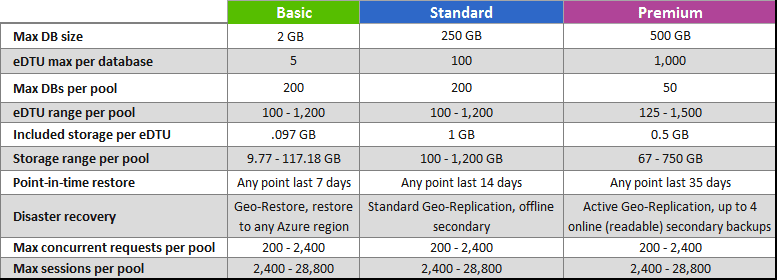
Azure SQL Database Service Tiers

Azure SQL Database Service tiers and database options (as of 3/Jan/2015):

Service tierTarget workloadsTransactional Perf. ObjectiveSLA
BasicBest suited for a small size database, supporting typically one single active operation at a given time. Examples include databases used for development or testing, or small scale infrequently used applications.Reliability per hour99.99%
StandardThe go-to option for most cloud applications, supporting multiple concurrent queries. Examples include workgroup or web applications.Reliability per minute99.99%
PremiumDesigned for high transactional volume, supporting a large number of concurrent users and requiring the highest level of business continuity capabilities. Examples are databases supporting mission critical applications.Reliability per second99.99%


BCDR optionBasic tierStandard tierPremium tier
Point In Time RestoreAny restore point within 7 daysAny restore point within 14 daysAny restore point within 35 days
Geo-RestoreERT < 12h 
RPO < 1h
ERT < 12h 
RPO < 1h
ERT < 12h 
RPO < 1h
Standard Geo-ReplicationNot includedERT < 30s 
RPO < 5s
ERT < 30s 
RPO < 5s
Active Geo-ReplicationNot includedNot includedERT < 30s 
RPO < 5s

Description of the terms:
• Disaster recovery (DR): a process of restoring the normal business function of the application
• Point in time restore: the ability to restore the database to a point in time in the past (within the backup retention period) in order to recover from data corruption caused by a human mistake or programmatic error
• Estimated Recovery Time (ERT): The estimated duration for the database to be fully functional after a restore/failover request.
• Recovery Point Objective (RPO): The amount of most recent data changes (time interval) the application could lose after recovery.

How is Standard Geo-replication different from Active Geo-replication?
First of all, standard geo-replication is built on the same technology as active geo-replication but is optimized for applications that use geo-replication only to protect the application from regional failures. The following list shows how standard geo-replication is different from active geo-replication:
1.Only one secondary database can be created in a Microsoft defined  “DR paired” Azure region. The list of the DR pairs can be found here.
2.The secondary is visible in the master database but cannot be directly connected to until failover is completed (offline secondary).
3.The secondary database is charged at a discounted rate as it is not readable (offline).

As a result some scenarios you could enable using active geo-replication are not possible with the standard geo-replication. The following table summarizes this delta

ScenarioStandard Geo-replicationActive Geo-replication
Regional disasterYesYes
DR drillYesYes
Online application upgradeNoYes
Online application relocationNoYes
Read load balancingNoYes

Friday, 1 January 2016

Comparison chart: Azure App Service Plans

Comparison charts provide the summary of any story in a more visually memorable way. As part of my learning, I plan to compile illustrations, architecture diagrams, comparison charts for easy reference.

The Azure App Service offering provides 5 tiers:
Features / Tiers Free - Dev/test apps Shared - Dev/test with higher limits Basic - Go live with basic apps Standard - Go live with web, mobile, logic apps Premium - Maximum scale, isolation, and enterprise connectivity
Cores Shared Shared 1,2,4 1,2,4 1,2,4,8
RAM (in GB) 1 0.5 1.75, 3.50, 7 1.75, 3.50, 7 1.75, 3.50, 7, 14
Storage (in GB) 1 1 10 50 500
Web, mobile, or API apps 10 100 Unlimited Unlimited Unlimited
Logic apps (Preview) 10 10 10 25 100
Disk space 1 GB 1 GB 10 GB 50 GB 500 GB
Maximum instances -- -- Up to 3 Up to 10 Up to 50
SLA -- -- 99.95% 99.95% 99.95%
Auto-Scale -- -- -- Supported Supported
Geo-distributed deployment -- -- -- Supported Supported
VPN hybrid connectivity -- -- -- Supported Supported
Staging environments -- -- -- 5 20
Custom domain -- Supported Supported Supported Supported
SSL certificates -- -- SSL Pricing 5 SNI SSL and 1 IP SSL included 5 SNI SSL and 1 IP SSL included
Automated Backups (/day) -- -- -- 2 50
Active mobile devices 500 / day 500 / day Unlimited Unlimited Unlimited
Offline Sync 500 calls / day 1 K calls / day 1 K calls / day Unlimited Unlimited
Logic Actions per day 200 200 200 10,000 50,000
Logic App data storage cap 1 Day / 1 GB 1 Day / 1 GB 1 Day / 1 GB 7 Days / 10 GB 30 Days / 10 GB
Core Connectors calls per Day 200 200 200 10,000 50,000
Enterprise Connectors calls per day* 200 200 200 200 200